
Choosing a reliable HDMI-over-network extender in 2026 means looking beyond distance claims. The right system should carry stable video and audio, fit the existing network, and remain manageable when rooms or sources change. In practice, a clear picture in a short demo is not enough. Check latency, resolution support, bandwidth needs, power options, and recovery after a signal interruption.
AVIXA’s Industry Outlook and Trends Analysis forecasts that the global professional audiovisual industry will grow from about $325 billion in 2024 to $402 billion by 2029. This is broad pro-AV market data, not a forecast for HDMI over IP specifically. Still, it points to a larger environment where networked AV matters. That distinction is important.
This guide compares Top Hdmi Over Network Extenders for 2026 by examining practical installation details, compatibility, control features, and likely use cases. A small meeting room may need a simple point-to-point kit; a campus or venue may need managed multicast and careful switch configuration. We would also like to include a direct quotation from a named HDMI-over-network expert. No verifiable source for such a quotation was provided, so attributing one here would risk misrepresenting that person. The comparison instead focuses on checkable product specifications and clearly identified industry data. Some details can be missed in a spec sheet. That is worth remembering.
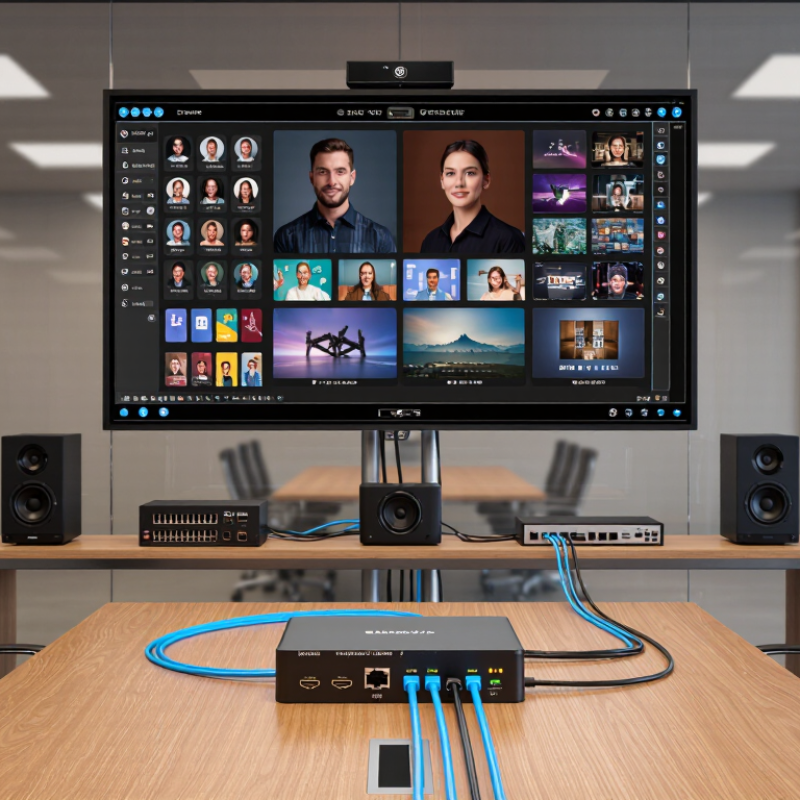
An HDMI over network extender carries video and audio between locations using network cabling. A transmitter converts the HDMI signal for transport; a receiver restores it near the display. The cable may look familiar, but the signal path is different.
HDMI Forum specifications list up to 48 Gbps for HDMI 2.1, while a typical 1 Gbps network link cannot carry that uncompressed data rate. Many extenders therefore use compression, lower bandwidth modes, or dedicated network capacity. Check supported resolution, refresh rate, color depth, and latency together. One headline number is not enough.
AVIXA’s 2024 Industry Outlook estimated the professional audiovisual market at about $325 billion in 2024, reflecting broad demand for installed AV systems. That figure does not measure extender performance, though.
For a real installation, confirm whether the system needs a dedicated network, supports multicast correctly, and passes control signals such as CEC or infrared. Test the actual cable run, switches, and displays before installation. Watch for frame drops. Even a small delay can feel obvious when a presenter’s lips do not match speech.
Product documentation may leave edge cases unclear, so allow time for testing—and revisit assumptions when the room’s requirements change.
HDMI over network extenders carry video and audio from a source device to a distant display. A transmitter takes the HDMI signal and sends it over network cabling, often as data packets. At the far end, a receiver converts the signal back to HDMI. A media player can sit in a cabinet while a screen hangs across the room.
Audio usually travels with the video, so a single cable can carry both picture and sound. Whether surround formats pass through depends on the extender, source, and display working together.
That matters. Some systems send signals over a direct cable; others use network switches, where bandwidth and settings such as multicast support may affect performance.
Cable category, length, and connector quality also shape reliability, so “network cable” alone is not a full specification.
Check the path. Compression may reduce bandwidth needs, but can add latency or alter image quality. For presentations, that delay may go unnoticed; for interactive use, it deserves testing.
I would verify the actual resolution, audio format, and cable route before installation. The details are easy to miss, and a clean-looking setup can still behave inconsistently.
When comparing HDMI over network extenders in 2026, start with the signal you actually need. A 4K label alone tells you little about refresh rate, color depth, or chroma sampling. Check whether the unit supports your display’s required resolution at its intended frame rate. That detail matters.
Latency and image compression deserve equal attention. For presentations, a small delay may go unnoticed; interactive displays and live camera feeds can expose it quickly. Look for clear specifications on end-to-end latency and whether video is compressed. Claims such as “visually lossless” can be difficult to compare without a stated format or test method. Check the fine print.
Distance ratings also depend on the network design. Confirm supported cable categories, maximum run length, and whether switches need specific multicast settings, such as IGMP snooping. Some models carry power over Ethernet, which can simplify a ceiling installation, but verify the switch’s power budget first. Audio return, EDID handling, and control passthrough for infrared or serial devices may prevent awkward workarounds later. In a rack, heat and access matter too; a compact unit can be frustrating if its ports face a crowded wall. I would still test a sample with the actual source and display, because specification sheets rarely capture every compatibility wrinkle.
| Extender Type | Typical Connection | Practical Distance | 4K Support Considerations | Network / Installation Needs | Best Suited For | Key Trade-Off |
|---|---|---|---|---|---|---|
| HDBaseT-class point-to-point | Dedicated Cat5e, Cat6, or Cat6a cable between transmitter and receiver | Often up to 100 m (328 ft) for supported configurations; cable category and the extender specification matter | Some models support 4K at 60 Hz with 4:4:4 color; confirm the stated HDMI format, color depth, and maximum cable length | Usually a direct cable run rather than a shared Ethernet network; some models carry control signals and power over the link | Meeting rooms, classrooms, and installations needing a dependable one-to-one connection | Typically less flexible for routing to many displays than an IP-based system |
| IP-based extender over 1 GbE | Standard Ethernet cabling and compatible network switches | Each copper Ethernet link is generally limited to 100 m (328 ft) per channel; additional distance can be added with suitable network equipment | 4K delivery commonly depends on video compression; verify resolution, frame rate, latency, and image-quality specifications | Requires compatible transmitters, receivers, and switch configuration; multicast systems may need IGMP support | Multi-room distribution where sources and displays need flexible network routing | Network congestion, configuration, and compression can affect performance |
| IP-based extender over 10 GbE | 10 Gigabit Ethernet cabling and compatible 10 GbE switches or direct links | Distance depends on the Ethernet medium and equipment; copper and fiber links have different limits | Higher bandwidth can accommodate demanding 4K formats, but the actual signal format and any compression remain model-specific | Requires 10 GbE-compatible network hardware; check port speed, cabling, multicast support, and receiver capacity | Installations with high-resolution sources, multiple endpoints, or greater bandwidth requirements | Higher equipment and infrastructure requirements than basic 1 GbE systems |
| HDMI over fiber | Optical fiber link between compatible transmitter and receiver | Can extend beyond copper-cable distances; the supported range varies by fiber type and system specification | Suitable options exist for high-bandwidth 4K signals; confirm supported HDMI features and whether the link is compressed | Requires compatible optical transceivers and the specified fiber; connector type and fiber mode must match | Long cable runs, electrically noisy environments, and links between buildings when properly designed | Fiber handling, termination, and transceiver compatibility require careful planning |
| Wireless HDMI extender | Dedicated wireless transmitter and receiver | Highly dependent on obstacles, interference, antenna placement, and the specified operating environment | Some systems advertise 4K support; check frame rate, latency, compression, and performance through walls | Needs suitable power and a clear radio environment; performance can vary with nearby wireless traffic | Temporary installations or spaces where running cable is impractical | Less predictable reliability and latency than a well-installed wired link |
Specifications vary by model. Confirm the supported resolution and refresh rate, color format, HDCP compatibility, audio formats, control features, cable requirements, and tested transmission distance before purchase. Ethernet distance figures refer to individual copper Ethernet links, not necessarily the total end-to-end reach of a system.
Choosing an HDMI-over-network extender in 2026 means matching distance, resolution, and network conditions—not just comparing advertised range. For a meeting room, a reliable 4K60 signal may matter more than the longest claimed reach. Check whether the unit uses a dedicated point-to-point link or shared IP infrastructure; shared networks can introduce congestion and delay. Confirm support for the required audio formats, content protection, and control signals before installation. Distance matters.
The 2018–2023 Annual Internet Report projected that video would account for 82% of global IP traffic by 2022. This is a forecast, not a measurement for 2026, but it highlights why network load deserves attention. For IP-based extenders, verify that switches support the required multicast settings and bandwidth. Also check cable category and run length against the extender’s documentation. A “4K” label alone does not confirm 4K60, HDR, or dependable performance over your actual cable route.
Tips: Test the complete setup before mounting displays. Use the intended source, cable, switch, and screen; then check for dropouts, lip-sync issues, and image changes. Keep a spare cable nearby. It helps. Conversely, a short test can miss problems that appear under sustained network traffic.
Choosing the right HDMI-over-network extender begins with the picture you need, not the longest distance on the box. Match its supported resolution, refresh rate, HDR, audio formats, and copy-protection requirements to every connected device. A 4K television may still show a blank screen if the source and display negotiate incompatible settings. Small details matter. AVIXA’s 2024 Industry Outlook and Trends Analysis projects global professional audiovisual revenue to reach about $402 billion by 2028, reflecting the growth of complex AV installations. That trend makes compatibility checks more important, not less.
Measure the actual cable route, including bends and patch-panel connections. Then compare it with the extender’s rated distance and required cable category. A published maximum is not a promise; real cable paths are rarely perfect. For a meeting room, test a laptop, display, and audio system together before mounting equipment. For gaming or live monitoring, check latency, because even a slight delay can feel distracting. Worth checking.
Consider the installation environment, too. Copper cabling can be convenient, while fiber may suit longer runs or electrically noisy spaces. Some extenders need a direct cable link; others work through network switches, so confirm the design before buying. Ask whether EDID management, power at the receiver, and status indicators are included. These features can save time when a ceiling-mounted display stops receiving a signal. Test before installation. Even careful planning can miss a device-specific quirk, so leave time for a real-world trial.
Compare the maximum link rates defined for each HDMI generation when checking whether an extender can support your source and display requirements.
These are HDMI specification link-rate limits, not guaranteed extender speeds or transmission distances. Check the extender’s supported resolution, refresh rate, chroma format, HDR features, and cable requirements for your setup.
| Cookie | Duration | Description |
|---|---|---|
| cookielawinfo-checkbox-analytics | 11 months | This cookie is set by GDPR Cookie Consent plugin. The cookie is used to store the user consent for the cookies in the category "Analytics". |
| cookielawinfo-checkbox-functional | 11 months | The cookie is set by GDPR cookie consent to record the user consent for the cookies in the category "Functional". |
| cookielawinfo-checkbox-necessary | 11 months | This cookie is set by GDPR Cookie Consent plugin. The cookies is used to store the user consent for the cookies in the category "Necessary". |
| cookielawinfo-checkbox-others | 11 months | This cookie is set by GDPR Cookie Consent plugin. The cookie is used to store the user consent for the cookies in the category "Other. |
| cookielawinfo-checkbox-performance | 11 months | This cookie is set by GDPR Cookie Consent plugin. The cookie is used to store the user consent for the cookies in the category "Performance". |
| viewed_cookie_policy | 11 months | The cookie is set by the GDPR Cookie Consent plugin and is used to store whether or not user has consented to the use of cookies. It does not store any personal data. |